Comparing POS Systems for Small Retailers: 2025 Guide
Selecting the optimal point-of-sale (POS) system is crucial for small retailers in 2025, demanding careful consideration of features, scalability, and cost to enhance operational efficiency and customer engagement.
Navigating the evolving landscape of retail technology can feel overwhelming, especially for small business owners. The right point-of-sale (POS) system is no longer just a cash register; it’s the central nervous system of your operation. This article focuses on Comparing POS Systems for Small Retailers: Finding the Best Fit for Your 2025 Needs, aiming to demystify your options and guide you toward a solution that truly empowers your business.
Understanding the Core Needs of Small Retailers
Small retailers operate with unique constraints and aspirations. Unlike large chains, they often have limited budgets, fewer dedicated IT staff, and a strong desire to maintain a personal connection with their customer base. A POS system for a small business must therefore be more than just transactional; it needs to be an intuitive, cost-effective tool that simplifies daily tasks and provides actionable insights without requiring extensive training or complex infrastructure.
The ideal POS solution for a small retailer should integrate seamlessly into their existing workflow, rather than disrupting it. This means prioritizing ease of use, swift setup, and reliable performance. Beyond processing sales, these systems should offer features that genuinely add value, helping owners manage inventory, understand customer behavior, and streamline operations, ultimately contributing to sustainable growth.
Key Features for Small Retail Success
- Intuitive Interface: A user-friendly design minimizes training time and reduces errors, crucial for businesses with fluctuating staff or limited resources.
- Inventory Management: Real-time tracking, low-stock alerts, and automated reordering prevent stockouts and overstocking, optimizing cash flow.
- Customer Relationship Management (CRM): Tools for capturing customer data, tracking purchase history, and managing loyalty programs foster repeat business.
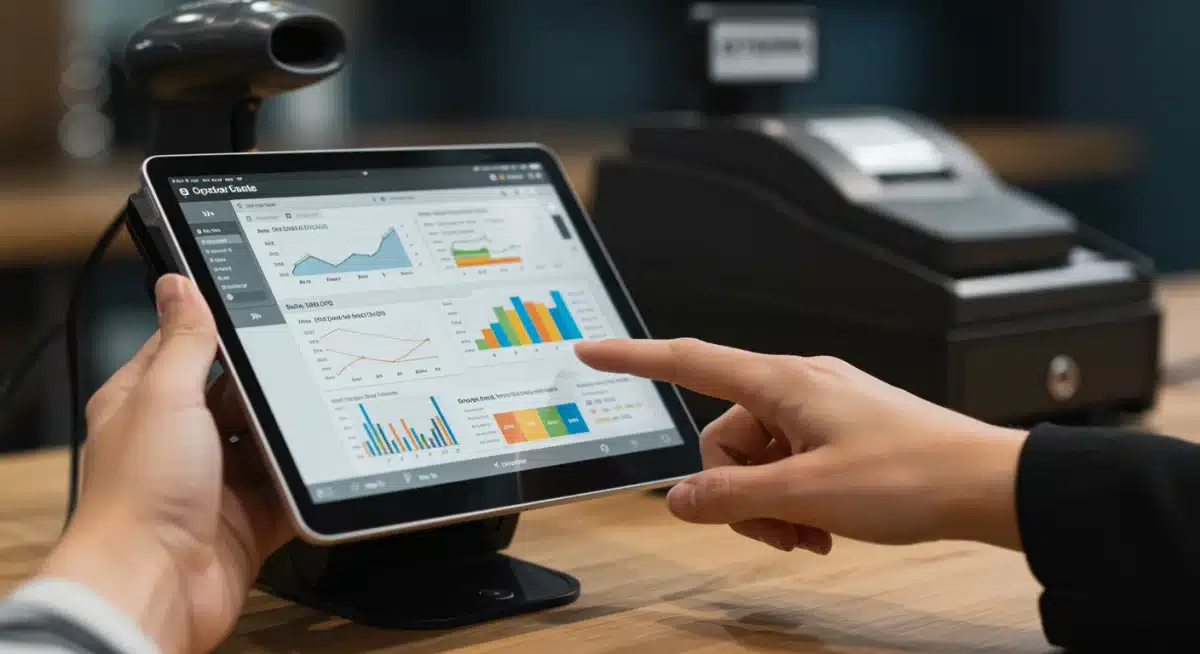
- Reporting and Analytics: Comprehensive reports on sales trends, product performance, and employee productivity provide valuable insights for strategic decision-making.
Ultimately, the core need for small retailers is a POS system that acts as a silent partner, handling the complexities of retail operations so owners can focus on what they do best: serving their customers and growing their business. It’s about finding a balance between robust functionality and straightforward usability, all within a sensible budget.
Cloud-Based vs. On-Premise: Making the Right Choice
One of the foundational decisions when selecting a POS system involves choosing between cloud-based and on-premise solutions. Each model presents distinct advantages and disadvantages that significantly impact a small retailer’s operational flexibility, security, and long-term costs. Understanding these differences is paramount to making an informed decision tailored to your specific business environment and future goals.
Cloud-based POS systems, also known as Software-as-a-Service (SaaS) models, operate entirely online. Data is stored on remote servers managed by the provider, accessible from any internet-connected device. This offers unparalleled flexibility and scalability, making them increasingly popular among small businesses seeking agility.
The Advantages of Cloud-Based POS
- Accessibility: Manage your business from anywhere, at any time, using a tablet, smartphone, or computer.
- Lower Upfront Costs: Typically involves subscription fees rather than large initial hardware and software purchases, easing budget constraints.
- Automatic Updates: Providers handle all software updates and maintenance, ensuring you always have the latest features and security patches.
- Scalability: Easily add new terminals or locations as your business grows without significant infrastructure investments.
On the other hand, on-premise POS systems involve software installed directly on your local hardware and servers. While they offer greater control over data and customization options, they come with a different set of responsibilities and financial implications. These systems might appeal to businesses with very specific, unique operational requirements or those operating in areas with unreliable internet access.
Considering On-Premise Solutions
Opting for an on-premise system means your business takes on the responsibility for server maintenance, data backups, and security. While this offers a high degree of control and potentially greater customization, it also translates to higher upfront costs for hardware and software licenses, as well as the need for dedicated IT expertise or external support. For many small retailers, the complexity and expense associated with on-premise solutions often outweigh the benefits, pushing them towards the more streamlined cloud-based alternatives.
Top POS Systems for Small Retailers in 2025
As we look towards 2025, several POS systems stand out for their robust features, user-friendly interfaces, and suitability for small retail environments. Each offers a unique blend of capabilities, making it essential for business owners to evaluate which system aligns best with their specific operational demands and growth objectives. The market is competitive, with providers continually innovating to meet the evolving needs of modern commerce.
Among the most prominent contenders, Square POS continues to be a favorite for its simplicity and accessibility. It’s particularly well-suited for businesses just starting or those with straightforward sales processes. Its free basic plan and transparent transaction fees make it an attractive entry point, while its ecosystem of hardware and software integrations allows for easy expansion as needs evolve.
Detailed Look at Leading Platforms
- Shopify POS: Ideal for retailers with an existing e-commerce presence, Shopify POS seamlessly integrates online and offline sales channels. It offers powerful inventory management, customer profiles, and multi-channel selling capabilities, making it perfect for businesses looking to unify their retail operations.
- Lightspeed Retail: Known for its advanced inventory management and vendor purchasing features, Lightspeed is a strong choice for specialty retailers, such as apparel, electronics, or sporting goods stores. Its robust reporting tools provide deep insights into sales performance and customer trends.
- Clover POS: Clover offers a versatile hardware suite and a marketplace of apps, allowing businesses to customize their POS system with specific functionalities. It’s highly adaptable, catering to a wide range of retail types, from quick-service restaurants to boutique shops.
Each of these systems provides a strong foundation for small retailers, but the ‘best’ choice ultimately depends on factors such as product type, sales volume, desired integrations, and budget. It’s crucial to consider not just the immediate needs but also how the system can support future growth and adaptation to new retail trends.
Essential Features and Integrations to Look For
Beyond the basic ability to process transactions, a modern POS system for a small retailer must offer a suite of features and integrations that enhance efficiency, improve customer experience, and provide valuable business intelligence. The right functionalities can transform a simple sales tool into a comprehensive business management platform, driving growth and profitability.
One of the most critical aspects is robust inventory management. Small businesses cannot afford stockouts or excessive inventory, both of which impact cash flow. A good POS system should offer real-time inventory tracking, automated reorder points, and the ability to manage multiple locations or variations of products (e.g., size, color). This level of detail ensures you always have the right products in stock, minimizing lost sales and optimizing storage space.
Beyond the Transaction: Key Integrations
- E-commerce Integration: For retailers with an online store, seamless integration between your physical and digital storefronts is non-negotiable. This ensures synchronized inventory, customer data, and sales reporting across all channels.
- Accounting Software Integration: Connecting your POS with accounting platforms like QuickBooks or Xero simplifies bookkeeping, reduces manual data entry, and ensures accurate financial reporting.
- Payment Processing: Evaluate the integrated payment processing options, considering transaction fees, supported payment types (credit cards, mobile payments, contactless), and security features.
- Employee Management: Features like time clock functionality, sales performance tracking, and permission settings for staff can streamline operations and improve accountability.
Furthermore, customer relationship management (CRM) tools within a POS system are invaluable. These allow you to capture customer information, track purchase history, manage loyalty programs, and segment customers for targeted marketing efforts. Understanding your customers better leads to personalized experiences and stronger relationships, fostering repeat business. The ability to integrate with third-party marketing tools further amplifies these efforts.
Cost Considerations and Budgeting for a POS System
For small retailers, the financial aspect of implementing a new POS system is often a primary concern. It’s crucial to look beyond the initial price tag and consider the total cost of ownership, which encompasses hardware, software, payment processing fees, and ongoing support. A well-structured budget ensures that the chosen system remains affordable and delivers a positive return on investment over time.
The cost structure for POS systems typically involves several components. Hardware costs can include terminals, barcode scanners, receipt printers, and cash drawers. While some providers offer proprietary hardware, others allow you to use off-the-shelf devices, potentially reducing initial outlay. Software costs are usually subscription-based for cloud systems, with monthly or annual fees varying based on features, number of users, and locations.
Breaking Down the Expenses
- Hardware: Consider whether your business needs a full setup or can leverage existing tablets or smartphones. Mobile POS (mPOS) solutions can significantly reduce hardware expenses.
- Software Subscriptions: Compare plans based on the features included, transaction limits, and scalability options. Many providers offer tiered pricing.
- Payment Processing Fees: These are often the most variable cost. Evaluate per-transaction fees, monthly minimums, and any additional charges for specific card types or payment methods.
- Installation and Training: While many modern systems are designed for easy self-setup, some businesses might benefit from professional installation or comprehensive training programs, which can incur additional costs.
- Ongoing Support and Maintenance: Understand what’s included in the subscription (e.g., 24/7 support, software updates) and what might be an extra charge.
When budgeting, it’s advisable to get detailed quotes from multiple vendors, outlining all potential costs. Don’t hesitate to negotiate or ask about bundled services that might offer better value. A clear understanding of all expenditures will prevent unexpected surprises and ensure the chosen POS system aligns with your financial capabilities, providing the necessary tools without undue strain on your budget.
Future-Proofing Your Retail Operations with the Right POS
The retail landscape is in constant flux, driven by technological advancements and evolving consumer expectations. Selecting a POS system in 2025 isn’t just about meeting current needs; it’s about investing in a solution that can adapt and grow with your business, effectively future-proofing your operations against unforeseen challenges and opportunities. The longevity and flexibility of your POS system can significantly impact your long-term success.
One key aspect of future-proofing is choosing a system that supports omnichannel retail. Consumers increasingly expect a seamless experience across online, in-store, and mobile channels. Your POS should facilitate this by unifying inventory, customer data, and sales history, allowing for services like buy online, pick up in-store (BOPIS) or ship from store. This adaptability ensures you can meet customers wherever they choose to shop.
Considerations for Long-Term Viability
- Scalability: Does the system allow for easy addition of new users, locations, or features as your business expands? Avoid solutions that will require a complete overhaul in a few years.
- API and Integration Capabilities: A robust API (Application Programming Interface) allows your POS to connect with a wide array of third-party applications, from marketing tools to advanced analytics platforms, ensuring you can integrate future technologies.
- Security and Compliance: With increasing data privacy concerns, ensure your POS provider adheres to the latest security standards (e.g., PCI compliance) and offers features like end-to-end encryption to protect sensitive customer data.
- Vendor Longevity and Support: Choose a provider with a proven track record, a commitment to innovation, and reliable customer support. This minimizes the risk of your system becoming obsolete or unsupported.
Furthermore, consider emerging technologies like AI-driven analytics, contactless payments, and personalized marketing tools. While you might not need all these features immediately, selecting a POS system that has the potential to integrate them in the future will ensure your business remains competitive and agile. A forward-thinking POS system is an investment in your retail business’s enduring relevance and profitability.
| Key Aspect | Description for Small Retailers |
|---|---|
| Ease of Use | Crucial for quick staff training and minimizing operational errors, especially with limited IT support. |
| Cost-Effectiveness | Balance upfront hardware, software subscriptions, and transaction fees against budget. |
| Essential Features | Look for robust inventory management, CRM, and detailed reporting to drive informed decisions. |
| Scalability & Integrations | Ensure the system can grow with your business and connect with other vital tools like e-commerce and accounting. |
Frequently Asked Questions About POS Systems
For small retailers, intuitive inventory management is arguably the most critical feature. It prevents stockouts, reduces waste from overstocking, and provides real-time insights into product performance, directly impacting profitability and customer satisfaction. Coupled with ease of use, it streamlines daily operations significantly.
Budgeting for a POS system varies, but small retailers should consider a range from $0 (for basic free software like Square) to several hundred dollars per month for more advanced, feature-rich subscriptions, plus hardware costs (which can range from $200 for a simple terminal to over $1,000 for a full setup). Factor in transaction fees as well.
While cloud-based POS systems offer significant advantages like lower upfront costs, remote access, and automatic updates, they rely on a stable internet connection. On-premise systems might be better for businesses in remote areas with unreliable internet or those requiring highly specialized, customized integrations and absolute data control.
Absolutely. Many modern POS systems include built-in CRM functionalities that allow you to track customer purchase history, manage loyalty programs, and gather contact information. This data enables personalized marketing efforts and rewards, fostering stronger customer relationships and encouraging repeat business, which is vital for small retailers.
Selecting an unsuitable POS system can lead to operational inefficiencies, increased costs, lost sales due to system downtime, inaccurate inventory, and frustrated staff. It can also hinder growth by lacking necessary features or scalability, potentially requiring a costly and disruptive migration to a new system later on.
Conclusion
The quest for the ideal POS system for small retailers in 2025 is a critical undertaking that can significantly shape a business’s operational efficiency, customer engagement, and overall profitability. By carefully evaluating core needs, understanding the distinctions between cloud-based and on-premise solutions, and prioritizing essential features and integrations, small business owners can make an informed decision. The right POS system is more than just a tool; it’s a strategic investment that future-proofs your retail operations, allowing you to adapt to market changes and thrive in a competitive landscape. Taking the time to research and compare options ensures you select a partner that empowers your growth for years to come.